Wednesday, 1 January 2014

Singleton Design Pattern

Singleton Pattern says that just "define a class that has only one instance and provides a global point of access to it".
In other words, a class must ensure that only single instance should be created and single object can be used by all other classes.

There are two forms of singleton design pattern
  • Early Instantiation: creation of instance at load time.
  • Lazy Instantiation: creation of instance when required.
Advantages: Saves memory because object is not created at each request. Only single instance is reused again and again.

Usage of Singleton design pattern: Singleton pattern is mostly used in multi-threaded and database applications. It is used in logging, caching, thread pools, configuration settings etc.

How to create Singleton design pattern?

To create the singleton class, we need to have static member of class, private constructor and static factory method.
  • Static member: It gets memory only once because of static, it contains the instance of the Singleton class.
  • Private constructor: It will prevent to instantiate the Singleton class from outside the class.
  • Static factory method: This provides the global point of access to the Singleton object and returns the instance to the caller.

Overloading

If a class have multiple methods by same name but different parameters, it is known as Method Overloading

Suppose you have to perform addition of the given numbers but there can be any number of arguments, if you write the method such as a(int,int) for two parameters, and b(int,int,int) for three parameters then it may be difficult for you as well as other programmers to understand the behavior of the method because its name differs. So, we perform method overloading to figure out the program quickly.  

Advantage of method overloading is: It increases readability of the program.

Overloaded methods are differentiated by the number, position and the type of the arguments passed into the method.
In java, method overloading is not possible by changing the return type of the method because there may occur ambiguity(it gives compile time error). 

There are two ways to overload the method in java
  1. By changing number of arguments
  2. By changing the data type

Example of Method Overloading by changing the no. of arguments:

class Calculation{  
  void sum(int a,int b){System.out.println(a+b);}  
  void sum(int a,int b,int c){System.out.println(a+b+c);}  
  
  public static void main(String args[]){  
  Calculation obj=new Calculation();  
  obj.sum(10,10,10);  
  obj.sum(20,20);  
  
  }  
}  
Output: 30
             40

Example of Method Overloading by changing data type of arguments:

class Calculation{  
  void sum(int a,int b){System.out.println(a+b);}  
  void sum(double a,double b){System.out.println(a+b);}  
  
  public static void main(String args[]){  
  Calculation obj=new Calculation();  
  obj.sum(10.5,10.5);  
  obj.sum(20,20);  
  
  }  
}  

Output: 21.0
             40


Constructors

Constructors:
  • Constructor is a special type of method that is used to initialize the object.
  • They method has the same name as that of class.
  • They do not have any return type not even void.
  • They are called or invoked when an object of class is created and can't be called explicitly.
  • They can be overloaded and are parameterized.
  • Attributes of an object may be available when creating objects if no attribute is available then default constructor is called.
  • It is optional to write constructor method in a class but due to their utility they are used. If no constructor is written default constructor is invoked  implicitly.
Example of default constructor: 
     
class Bike{  
  
Bike(){System.out.println("Bike is created");}  
  
public static void main(String args[]){  
Bike b=new Bike();  
}  
}  

Output: Bike is created

Example of parameterized constructor:

class Student{  
    int id;  
    String name;  
      
    Student(int i,String n){  
    id = i;  
    name = n;  
    }  
    void display(){System.out.println(id+" "+name);}  
   
    public static void main(String args[]){  
    Student s1 = new Student(111,"Karan");  
    Student s2 = new Student(222,"Aryan");  
    s1.display();  
    s2.display();  
   }  
}  

Output: 111 Karan
             222 Aryan
 
Example of constructor overloading:
 
class Student{  
    int id;  
    String name;  
    int age;  
    Student(int i,String n){  
    id = i;  
    name = n;  
    }  
    Student(int i,String n,int a){  
    id = i;  
    name = n;  
    age=a;  
    }  
    void display(){System.out.println(id+" "+name+" "+age);}  
   
    public static void main(String args[]){  
    Student s1 = new Student(111,"Karan");  
    Student s2 = new Student(222,"Aryan",25);  
    s1.display();  
    s2.display();  
   }  
}  

Output: 111 Karan 0
             222 Aryan 25


Monday, 30 December 2013

JIT (Just In Time) Compiler

The Just-In-Time (JIT) compiler is a component of the Java™ Runtime Environment. It improves the performance of Java applications by compiling bytecodes to native machine code at run time.
Java programs consists of classes, which contain platform-neutral bytecodes that can be interpreted by a JVM on many different computer architectures. At run time, the JVM loads the class files, determines the semantics of each individual bytecode, and performs the appropriate computation. The additional processor and memory usage during interpretation means that a Java application performs more slowly than a native application. The JIT compiler helps improve the performance of Java programs by compiling bytecodes into native machine code at run time.
The JIT compiler is enabled by default, and is activated when a Java method is called. The JIT compiler compiles the bytecodes of that method into native machine code, compiling it "just in time" to run. When a method has been compiled, the JVM calls the compiled code of that method directly instead of interpreting it. Theoretically, if compilation did not require processor time and memory usage, compiling every method could allow the speed of the Java program to approach that of a native application.
JIT compilation does require processor time and memory usage. When the JVM first starts up, thousands of methods are called. Compiling all of these methods can significantly affect startup time, even if the program eventually achieves very good peak performance.

Demo of Date class program

public class Date {

int dd,mm,yy;
void display(int a,int b,int c)
{
dd=a;
mm=b;
yy=c;
System.out.println("Date is:"+dd +"/"+mm +"/"+yy);
}
public static void main(String[] args) {
Date dt=new Date();
dt.display(30,12,2013);
}

}
Output: Date is:30/12/2013


Sunday, 29 December 2013

How to run java file on dos

1.       Create a text document, write your code in it and save it as “.java” file.


2.       To compile the java file go to dos prompt. Go to Run and type cmd click ok.

3.       Go to the directory where file is saved.


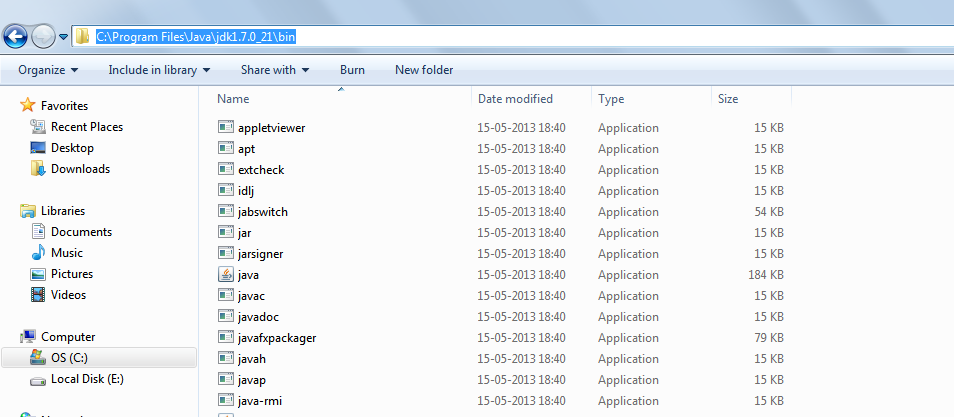
4.       Set path of java compiler so that dos prompt will find it.
4.1. Go to computer right click and click on properties

4.2.  Click advanced settings   

4.3. Click environment variables       
                   
4.4.  Edit path and at the end of the path put a semicolon(;) and write path of your jdk bin after semi colon and click ok 
                 path of your jdk
 
               put a semi colon and copy that path in system variable value 

If path is not set dos will not be able to find the java compiler and will get a message. 


5.       Once the path is set run your java file using the command- javac filename.java 


6.       Your file is compiled and  .class file is created which is platform independent. 

7.       Now you can see the output of your file using the command- java classname. 


 While compiling your file compile your .java file and when you run your file run it with the classname without extensions, eg. java Helloworld 

Features of Java

There is given many features of java. They are also called java buzzwords.

1.Simple:
syntax is based on C++ (so easier for programmers to learn it after C++).
2.Object-oriented:
Object-oriented programming(OOPs) is a methodology that simplify software development and maintenance by providing some rules.
Basic concepts of OOPs are:
  1. Object
  2. Class
  3. Inheritance
  4. Polymorphism
  5. Abstraction
  6. Encapsulation
3.Platform independent:
The Java platform differs from most other platforms in the sense that it's a software-based platform that runs on top of other hardware-based platforms.It has two components:
  1. Runtime Environment
  2. API(Application Programming Interface)
4.Secured:
Java is secured because:
  • No explicit pointer
  • Programs run inside virtual machine sandbox.
5.Robust:
Robust simply means strong. Java uses strong memory management. There are lack of pointers that avoids security problem. There is automatic garbage collection in java. There is exception handling and type checking mechanism in java. All these points makes java robust.
6.Architecture neutral:
There is no implementation dependent features e.g. size of primitive types is set.
7.Portable:
We may carry the java bytecode to any platform.
8.High Performance:
Java is faster than traditional interpretation since byte code is "close" to native code still somewhat slower than a compiled language (e.g., C++).
9.Distributed:
We can create distributed applications in java. RMI and EJB are used for creating distributed applications. We may access files by calling the methods from any machine on the internet.
10.Multithreaded:
A thread is like a separate program, executing concurrently. We can write Java programs that deal with many tasks at once by defining multiple threads. The main advantage of multi-threading is that it shares the same memory. Threads are important for multi-media, Web applications etc.